4 posts tagged with "Algorithm"

View All Tags

検索エンジンを実装 (6)NOT演算

· 3 min read

Yu Sasaki
Enterprise Security Manager / Advisor

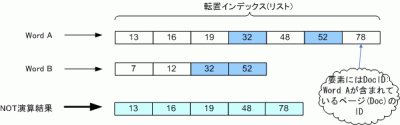
今回は集合演算のNOT演算ついて紹介します。この処理は、例として検索の際に「sky NOT rain」と指定すると、"sky"というキーワードを含むページから"rain"を含むページを除きます。

NOT演算処理の概要
NOT演算結果

上の図から、ある2つの語の転置インデックスリストをA, Bとします。ここで、リスト要素をそれぞれa, b(整数)とし演算結果を格納するリストをCとするとき、NOT演算は主に以下の処理内容を繰り返します。

  1. if a < b then 要素aをCの末尾に追加し、aにリストAの次の要素を代入
  2. if a = b then A, Bが指す次の要素をa, bに代入
  3. if a > b then bにリストBの次の要素を代入

ソースコード

今回はNOT演算処理を行う部分(メソッド)のみを示します。後で示す実行結果は、前のブログラムをベースにintersect()メソッドの挿入箇所を今回のものに置き換えたものです。

import java.util.ArrayList;
/**
* 検索エンジンのNOT演算
*/
public class BooleanRetrieval {
/**
* NOT演算処理
* @param postsSet 全ての検索語の転置インデックスリスト
* @return 演算後の転置インデックスリスト
*/
public static ArrayList<integer> subtract(ArrayList<arrayList<integer>> postsSet) {
ArrayList<integer> result; // 最終演算結果
if (postsSet == null) return null;
int len = postsSet.size();
if (len == 0) return null;
else if (len == 1) return postsSet.get(0);
result = postsSet.get(0);
for (int i = 1; i < len; i++) {
result = subtract(result, postsSet.get(i));
}
return result;
}
public static ArrayList<integer> subtract(ArrayList<integer> p1, ArrayList<integer> p2) {
ArrayList<integer> answer = new ArrayList<integer>(); // 2語の演算結果
int len1 = p1.size();
int len2 = p2.size();
int i=0, j=0;
while (i<len1 && j<len2) {
int diff = p1.get(i) - p2.get(j);
if (diff == 0) {
i++; j++;
} else if (diff < 0) {
answer.add(p1.get(i));
i++;
} else {
j++;
}
}
while (i<len1) { answer.add(p1.get(i++)); }
while (j<len2) { answer.add(p2.get(j++)); }
return answer;
}
}
単語 freq, docID
15 : 1, [2]
5 : 1, [2]
After : 1, [1]
As : 1, [1]
I : 3, [0, 1, 2]
<中略>
that : 1, [2]
the : 3, [0, 1, 2]
think : 3, [0, 1, 2]
this : 1, [2]
time : 2, [0, 2]
to : 2, [0, 1]
touch : 1, [1]
tremendously : 1, [1]
uncertainty : 1, [1]
use : 1, [2]
vigorous : 1, [1]
wanna : 1, [1]
well : 1, [1]
what : 1, [0]
when : 1, [1]
where : 1, [0]
why : 1, [1]
with : 1, [1]
検索語: the think
結果 :文書中に存在しません。
検索語: the use
結果 :文書ID [0, 1]に存在します。
検索語: the to
結果 :文書ID [2]に存在します。
検索語: quit

おー、けっこうたのしくなってきましたねー。
検索エンジンを実装 (5)OR演算

· 4 min read
Yu Sasaki
Enterprise Security Manager / Advisor

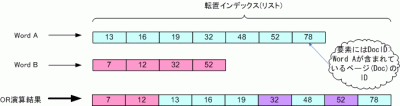
前回がAND演算でしたので今回はOR演算ついて紹介します。今記事で紹介している演算アルゴリズムよりも高効率なものは存在するようですが、今回は割愛します。

OR演算処理の概要

OR演算結果

上の図から、ある2つの語の転置インデックスリストをA, Bとします。ここで、リスト要素をそれぞれa, b(整数)とし演算結果を格納するリストをCとするとき、OR演算は主に以下の処理内容を繰り返します。

  1. if a < b then 要素aをCの末尾に追加し、aにリストAの次の要素を代入
  2. if a = b then 要素aをCの末尾に追加し、A, Bが指す次の要素をa, bに代入
  3. if a > b then 要素bをCの末尾に追加し、bにリストBの次の要素を代入

ソースコード

今回はOR演算処理を行う部分(メソッド)のみを示します。後で示す実行結果は、前回ブログラムをベースにintersect(postsSet)の箇所を今回のものに置き換えたものです。

import java.util.ArrayList;
import java.util.Collections;
/**
* 検索エンジンのOR演算
*/
public class BooleanRetrieval {
/**
* OR演算処理
* @param postsSet 全ての検索語の転置インデックスリスト
* @return 演算後の転置インデックスリスト
*/
public static ArrayList<integer> union(ArrayList<arrayList<integer>> postsSet) {
ArrayList<integer> result; // 最終演算結果
if (postsSet == null) return null;
int len = postsSet.size();
if (len == 0) return null;
else if (len == 1) return postsSet.get(0);
result = postsSet.get(0);
for (int i = 1; i < len; i++) {
result = union(result, postsSet.get(i));
}
return result;
}
public static ArrayList<integer> union(ArrayList<integer> p1, ArrayList<integer> p2) {
ArrayList<integer> answer = new ArrayList<integer>(); // 2語の演算結果
int len1 = p1.size();
int len2 = p2.size();
int i=0, j=0;
while (i<len1 && j<len2) {
int diff = p1.get(i) - p2.get(j);
if (diff == 0) {
answer.add(p1.get(i));
i++; j++;
} else if (diff < 0) {
answer.add(p1.get(i));
i++;
} else {
answer.add(p2.get(j));
j++;
}
}
while (i<len1) { answer.add(p1.get(i++)); }
while (j<len2) { answer.add(p2.get(j++)); }
return answer;
}
}
単語 freq, docID
15 : 1, [2]
5 : 1, [2]
After : 1, [1]
As : 1, [1]
I : 3, [0, 1, 2]
<中略>
should : 2, [0, 1]
so : 2, [1, 2]
some : 1, [2]
standard : 1, [0]
such : 2, [1, 2]
than : 1, [2]
that : 1, [2]
the : 3, [0, 1, 2]
think : 3, [0, 1, 2]
this : 1, [2]
time : 2, [0, 2]
to : 2, [0, 1]
touch : 1, [1]
tremendously : 1, [1]
uncertainty : 1, [1]
use : 1, [2]
vigorous : 1, [1]
wanna : 1, [1]
well : 1, [1]
what : 1, [0]
when : 1, [1]
where : 1, [0]
why : 1, [1]
with : 1, [1]
検索語: the when
結果 :文書ID [0, 1, 2]に存在します。
検索語: should so
結果 :文書ID [0, 1, 2]に存在します。
検索語: this touch
結果 :文書ID [1, 2]に存在します。
検索語: use than
結果 :文書ID [2]に存在します。
検索語: where why
結果 :文書ID [0, 1]に存在します。
検索語: quit

おー、なんだかもりあがってきましたねー。

話は変わりますが、最近よく実感していることの一つに、ソフトウェアの仕様が変更されると場合によっては設計を根本から変える必要があること。

そして、手がけているソフトウェアが今後アップグレードを繰り返していくと予測できるなら、現時点で取り組んでいる設計に費やす時間はほどほどに、ということです。OO分析設計を用いて保守性・拡張性を高めるのもいいけれど、その設計上での拡張が今後の仕様変更に耐えうるとは限りません。

勿論、最初の設計が肝心であることには変わりないですけれど。それでも留意。

検索エンジンを実装 (4)AND演算

· 7 min read
Yu Sasaki
Enterprise Security Manager / Advisor

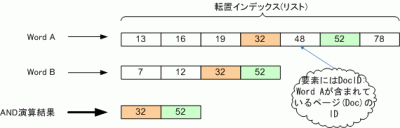
AND演算処理の概要

AND演算結果 上の図から、ある2つの語の転置インデックスリストをA, Bとします。ここで、要素をそれぞれa, b(整数)とし演算結果を格納するリストをCとするとき、AND演算は主に以下の処理内容を繰り返します。

  1. if a < b then aの次の要素をaに代入
  2. if a = b then 要素aをCの末尾に追加しA, Bが指す要素を一つ進める

プログラムの主な処理内容

  1. 検索対象テキストを単語に分割。
  2. 単語を転置インデックスに登録。ここで、1単語あたりに格納する情報は、その単語の出現頻度とその文書ID。転置インデックスのデータ構造はTreeMapを使用しkeyに単語、valueはIndexRecordでputします。
  3. ユーザからの標準入力をパースしAND演算(Intersectメソッドで実現しています)。

以下に、ソースコードと実行結果を示します。

IndexRecord.java

1つのトークン(単語)に対するインデックス情報(docIDリストや出現頻度情報)

import java.util.ArrayList;
/*
* 1つのトークン(単語)に対するインデックス情報
*/
public class IndexRecord {
// 出現文書IDリスト(通常ソートの必要あり)
private ArrayList<integer> posts;
// 出現頻度(今回は同一doc内の頻度はカウントしない)
private int freq;
public IndexRecord(int id) {
posts = new ArrayList<integer>();
posts.add(id);
freq = 1;
}
/** docIDをリストに追加(今回は同一docIDのtermはカウントしない) */
public void addDocID(int id) {
if (!existDocID(id)) {
posts.add(id); // docIDの追加
freq++; // 出現頻度のカウントアップ
}
}
/** docIDが既にリスト中に存在するか否か */
public boolean existDocID(int id) {
return (posts.indexOf(id) != -1) ? true : false;
}
public String toString() {
String str = freq + ", "+ posts;
return str;
}
public ArrayList<integer> getPosts() {
return posts;
}
}

BooleanTest.java (AND演算のテストプログラム)

import java.io.BufferedReader;
import java.io.IOException;
import java.io.InputStreamReader;
import java.util.ArrayList;
import java.util.Collections;
import java.util.StringTokenizer;
import java.util.TreeMap;
/**
* 検索エンジンのAND演算処理
* Web page: https://yukun.info/
* license GPL
*/
public class BooleanTest {
// 検索対象テキスト
static String doc0 = "It is meaningless only to think my long further aims idly. "+
"It is important to set my aims but at the same time I should confirm my present condition. "+
"Unless I set the standard where I am in any level, I'll be puzzled about what I should do from now on. It's in my case.";
static String doc1 = "Today, I enjoyed playing with friends daytime. "+
"After enjoying, I got back to my daily life with an vigorous power. "+
"I should think so, but why did I feel touch of uncertainty and regret? "+
"I wanna enjoy myself and another tremendously during the day when I've played. "+
"Well, As well as I commit play to quality, I'll choose such kinds of play.";
static String doc2 = "I'll manage the limited time in a day. "+
"I think that I divide the time into some intervals such as 5 minutes, "+
"15 minutes and more than one hour and so on. I'll make use of this character of the interval.";
public static void main(String[] args) {
ArrayList<string> docIDlist = new ArrayList<string>();
// 文書を格納
docIDlist.add(doc0);
docIDlist.add(doc1);
docIDlist.add(doc2);
StringTokenizer st[] = new StringTokenizer[3];
String stripChars = ".,:;?!"'[]{}()"; // 除外文字
// 文字列を空白で区切るよう設定
for (int i = 0; i < st.length; i++) {
st[i] = new StringTokenizer(docIDlist.get(i), " ");
}
// 転置インデックス用のMap
TreeMap<string, IndexRecord> termMap = new TreeMap<string , IndexRecord>();
// 分割されたトークンを取得
for (int i = 0; i < st.length; i++) {
// ここでのパラメータiはdocIDを指すことと同じ
while (st[i].hasMoreTokens()) {
// 文字列トークンの先頭・末尾の文字をフィルタリング
// org.apache.commons.lang.StringUtilsクラスを使用
// http://commons.apache.org/proper/commons-lang/
String term = StringUtils.strip(st[i].nextToken(), stripChars);
//System.out.println("値 : " + term);
if(termMap.containsKey(term)) {
// 登録されているtermならdocIDの追加とカウントアップ
IndexRecord ir = termMap.get(term);
ir.addDocID(i);
termMap.put(term, ir);
} else {
// termMapに登録されていないtermならdocIDと合わせて登録
termMap.put(term, new IndexRecord(i));
}
}
} // for loop ends
// termMapのデバッグプリント
System.out.println("単語 freq, docID");
for (String part : termMap.keySet()) {
System.out.printf("%-12s : %sn", part, termMap.get(part));
}
BufferedReader br = new BufferedReader(new InputStreamReader(System.in));
String words = "";
while (true) {
ArrayList<arrayList<integer>> postsSet = new ArrayList<arrayList<integer>>();
System.out.print("検索語: ");
try {
// ユーザからの標準入力を受付
words = br.readLine();
if (words.equals("quit")) break;
// 入力文字列をパース
StringTokenizer parser = new StringTokenizer(words, " ");
while (parser.hasMoreTokens()) {
String term = StringUtils.strip(parser.nextToken(), stripChars);
// termMapに登録されている単語か否か
if (termMap.containsKey(term)) {
postsSet.add(termMap.get(term).getPosts());
} else {
postsSet = null;
break;
}
}
// AND演算処理
ArrayList<integer> result = intersect(postsSet);
System.out.print("結果 :");
if (result == null || result.size() == 0)
System.out.println("文書中に存在しません。");
else
System.out.println("文書ID "+ result +"に存在します。");
} catch (IOException e) {
e.printStackTrace();
}
}
} // main() ends
// AND演算処理メソッド
public static ArrayList<integer> intersect(ArrayList<arrayList<integer>> postsSet) {
if (postsSet == null) return null;
int len = postsSet.size();
if (len == 0) return null;
else if (len == 1) return postsSet.get(0);
// postsSetを昇順にソート(演算回数の削減)
Collections.sort(postsSet, new FreqComparator());
ArrayList< Integer > result = postsSet.get(0);
for (int i = 1; i < len; i++) {
result = intersect(result, postsSet.get(i));
}
return result;
}
public static ArrayList<integer> intersect(ArrayList<integer> p1, ArrayList<integer> p2) {
ArrayList<integer> answer = new ArrayList<integer>();
int len1 = p1.size();
int len2 = p2.size();
for (int i=0, j=0; i< len1 && j < len2; ) {
if (p1.get(i) == p2.get(j)) {
answer.add(p1.get(i));
i++; j++;
} else if (p1.get(i) < p2.get(j)) {
i++;
} else {
j++;
}
}
return answer;
}
}

FreqComparator.java (ArrayList要素のソート用)

import java.util.ArrayList;
import java.util.Comparator;
public class FreqComparator implements Comparator<object>{
public int compare(Object o1, Object o2){
return ((ArrayList<integer>) o1).size() - ((ArrayList<integer>) o2).size();
}
}

実行結果

単語 freq, docID
15 : 1, [2]
5 : 1, [2]
After : 1, [1]
As : 1, [1]
I : 3, [0, 1, 2]
<中略>
set : 1, [0]
should : 2, [0, 1]
so : 2, [1, 2]
some : 1, [2]
standard : 1, [0]
such : 2, [1, 2]
than : 1, [2]
that : 1, [2]
the : 3, [0, 1, 2]
think : 3, [0, 1, 2]
this : 1, [2]
time : 2, [0, 2]
to : 2, [0, 1]
touch : 1, [1]
<中略>
検索語: think that
結果 :文書ID [2]に存在します。
検索語: wanna play to
結果 :文書ID [1]に存在します。
検索語: the java
結果 :文書中に存在しません。
検索語: should so
結果 :文書ID [1]に存在します。
検索語: time to
結果 :文書ID [0]に存在します。
検索語: well only
結果 :文書中に存在しません。
検索語: the time
結果 :文書ID [0, 2]に存在します。
検索語: quit

おー、なんだか楽しくなってきましたね。

文字列の区切り方

今回は検索対象テキストを英文に絞ったため、テキスト中の空白文字で区切ることでトークンを抽出できました。対して、日本語テキストの場合は区切り記号等は無い為、n-gramか形態素辞書などを用いてトークンに区切ることで実現できます。日本語文の区切り方は色々ありますが、中でも簡単な方法は、文字種(英文字、記号、ひらがな、カタカナ、漢字)の違いを区切りの境界と捉える方法です。 余談ですが、ブラウザやエディタ等で文字の上でダブルクリックするとカーソル下の文字列が選択状態になりますが、その範囲を決定する際に上述の方法が応用されているようです。ソフトによってはトリプルクリックするとカーソル下の行全体が選択状態になります(使うと編集が楽です)。

検索エンジンを実装 (1)転置インデックス作成

· 2 min read
Yu Sasaki
Enterprise Security Manager / Advisor

今回はN-gramでテキストを分解します。N-gram法とは対象の文字列を一定のN文字単位で分解し、それの出現頻度を求める方法です。これによって、検索エンジンに使われる転置インデックスを作成したいと思います。転置インデックスの作成方法にはN-gramの他に形態素解析があります。両者の性能の長短は全文検索 - Wikipediaに詳しく載っています。

Javaソースコード(Make2gram.java)

さて、まずは文字列を2単語に切り分けるプログラムを作成しました。データ構造は単純にArrayListで、出現頻度も求めていません。

import java.io.*;
import java.util.*;
/**
* N-gram法
*/
public class Make2gram {
public static void main(String[] args) {
final short nsepa = 1; // 2gram
String line;
ArrayList<stringBuffer> filelist = new ArrayList<stringBuffer>();
ArrayList<stringBuffer> bigram = new ArrayList<stringBuffer>();
if (args.length < 1) { // コマンドライン引数の数
System.out.println("How to use: java Make2gram [filename]");
System.exit(1);
}
try {
BufferedReader br = new BufferedReader(new FileReader(args[0]));
while ((line = br.readLine()) != null) {
//System.out.println(line);
filelist.add(new StringBuffer(line)); // 入力ファイルは一行=一要素として格納
}
br.close();
}
catch (Exception e) {
System.err.println("[main] : " + e.toString());
}
for (Iterator it = filelist.iterator(); it.hasNext(); ) {
StringBuffer str = (StringBuffer) it.next();
int lm = str.length() - nsepa;
for (int i = 0; i < lm; i++) {
StringBuffer bi = new StringBuffer(4); // 4Byte(2文字)分の容量(Javaの内部文字コードはUnicode)
bi.append(str.charAt(i)); // append():文字列の末尾に追加
bi.append(str.charAt(i+1));
bigram.add(bi);
//System.out.print(str.charAt(i));
//System.out.println(str.charAt(i+1));
}
}
// 2-gramを表示
for (Iterator it = bigram.iterator(); it.hasNext(); ) {
System.out.println(it.next());
}
}
}

入力ファイル(text.txt)

検索された文書は「更新順」「ファイル名順」「文書のタイトル順」などにソートされる。
一般的な検索エンジンでは独自のランク付けルールも適用し「重要度」などと呼んでいるものもある。

実行結果

検索
索さ
され
れた
た文
文書
書は
は「
「更
更新
新順
順」
」「
…<省略>…