メインコンテンツまでスキップ

How to put off many books

· 約1分

Yu Sasaki
Enterprise Security Manager / Advisor

I continue to clean up my room after I've moved to new house. I worry about how to put off many books that I brought from family home and I can't store in new house such as technical books and novels. It is "MOTTAINAI" to put off as dust so at first I'm planing to sell in Amazon market place but I recognize it is troublesome and low margin task with respect to spend much time to register the book, respond to buyer, send book, inform them. So I'll request to cutting vendors to cut books and after that I'll scan them as PDF or JPG data to read by some devices and I can save the space in my house.
Python: ソースコード中でのUTF-8文字(日本語等)のエンコーディング指定

· 約1分
Yu Sasaki
Enterprise Security Manager / Advisor

Pythonスクリプトの実行(コンパイル→実行)の際に下記のエラーが発生した場合、

SyntaxError: Non-ASCII character '\ABC' in file C:\XXX\YYY\ZZZ.py on line MM,
but no encoding declared; see http://www.python.org/peps/pep-0263.html for details

ソースコード中にASCII以外の文字(日本語など)が含まれているがエンコードの指定が無いことが原因となる。 対処法はスクリプトの先頭行に下記の何れかの1行記述することでUTF-8文字の使用を宣言する。

# coding: utf-8

# -*- coding: utf-8 -*-

参考サイト

Python: MS Word ファイルからテキストファイルへ変換

· 約2分
Yu Sasaki
Enterprise Security Manager / Advisor

COM(Component Object Model)を使用してWordファイル内のテキストをテキストファイルへ抽出・変換するスクリプト。

ソースコード

# coding: utf-8
import fnmatch, os, sys, win32com.client
if __name__ == '__main__':
wa = win32com.client.gencache.EnsureDispatch("Word.Application")
try:
for path, dirs, files in os.walk(sys.argv[1]): # コマンドラインより探索ディレクトリpathを取得
for filename in files:
if not fnmatch.fnmatch(filename, "*.doc"): continue # wordファイルの拡張子かをパターン・マッチング
doc = os.path.abspath(os.path.join(path, filename)) # wordファイルへの絶対パスを作成
print "processing %s in %s" % (doc, path)
wa.Documents.Open(doc)
txt = doc[:-3] + 'txt' # 変換保管するテキストファイル名
wa.ActiveDocument.SaveAs(txt, FileFormat=win32com.client.constants.wdFormatText)
wa.ActiveDocument.Close()
finally:
wa.Quit() # Wordの終了

We start to share our study progress

· 約1分
Yu Sasaki
Enterprise Security Manager / Advisor

From today, my sister and I have started to share our study progress in order to maintain our motivation to continue to study. Because we consider that it is difficult for us to maintain it after daily work by oneself. We choose Facebook groups as the tool to confirm our progress because it is convenient to share our daily progress such as "Today I've studied AAA" and "How to start to study is BBB". At first, we will try to use it whether it is an effective or not. After that, We'll rule about how to report our daily progress with trial and error.

Flex: State、Transitionによる画面遷移 - ログイン画面

· 約2分
Yu Sasaki
Enterprise Security Manager / Advisor

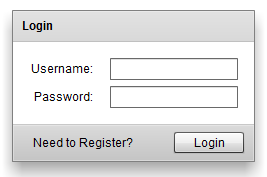
Flex: State、Transitionによる画面遷移 - ログイン画面 FlexのStateの遷移によって表示するUIを変更することで、簡潔に画面遷移を実現する。その際のTransition効果(フェード)を付与する。今回はログインフォームを例に採り、ユーザーのログイン画面と新規登録画面の2つの状態をStateによって切り替えるmxmlソースを下記に紹介する。

WordPress: 本文・コメント中のURLの自動リンクを抑制する - make_clickable

· 約1分
Yu Sasaki
Enterprise Security Manager / Advisor

最近のWordPressは本文・コメント内のURL(http:~、ftp:~)に自動的にリンクを貼る機能があるのだが、ソースコード中の文字列にまでリンクを貼られるとコードそのものが崩れる為、それを抑制するよう使用テーマのfunctions.phpに以下のコードを追記する。

WordPress: Facebook OGP Social Plugins(Like、コメント)の設置方法

· 約4分
Yu Sasaki
Enterprise Security Manager / Advisor

FacebookのOGP pluginについては、結構な頻度で仕様変更があるので、Webにある過去の記事を参考にさせて頂くものの、なかなか上手くいかないこともあり、今回設置には手間取ったので、その作業経過をまとめておきます。結論から言うと設置にはWordPressのプラグインは使用せず、テーマファイルを直接編集する方法を採り、無事FacebookのDebugツールで認識できました。

Linux: RedmineとSubversionのインストール・設定例

· 約7分
Yu Sasaki
Enterprise Security Manager / Advisor

Linux(ここではCentOS)にプロジェクト管理ソフトウェアであるRedmine 1.2.2とバージョン管理システムであるSubversionのインストール方法と設定例を以下に紹介。想定としては、WebサーバやDB以外は何も設定されていないサーバ環境を対象とした手順。すでにインストールしているものや設定済みのものは適時読み飛ばし下さい。 ※参考サイトは記事の末尾をご参照。