メインコンテンツまでスキップ

Python: リストの要素の追加と削除、取出し - append()、extend()、pop()、remove()メソッド

· 約2分

Yu Sasaki
Enterprise Security Manager / Advisor

ソースコード

#!/usr/bin/python
# coding: UTF-8
# リストの要素の追加と削除(取出し) | append()、extend()、pop()、remove()メソッドの使い方
a = [3, 5, 7, 9, 11]
print a
a.append(13) # 引数のオブジェクトをリストの末尾に追加
print a
a.extend([15, 17, 19, 21]) # 引数のシーケンスを展開して末尾に追加
print a
elm = a.pop() # リストの末尾から要素を1つ取り出す
print 'elm == %d' % elm
print a
elm = a.pop(4) # 引数にリストのインデックスを取り、その要素を取り出す
print 'elm == %d' % elm
print a
a.remove(13) # 引数のオブジェクトをリスト要素から削除する
print a

実行結果

[3, 5, 7, 9, 11]
[3, 5, 7, 9, 11, 13]
[3, 5, 7, 9, 11, 13, 15, 17, 19, 21]
elm == 21
[3, 5, 7, 9, 11, 13, 15, 17, 19]
elm == 11
[3, 5, 7, 9, 13, 15, 17, 19]
[3, 5, 7, 9, 15, 17, 19]
リファレンス

チュートリアル

Python: モジュールにテスト関数を定義 - 重複のない乱数(整数MIN以上MAX以下)の生成

· 約2分
Yu Sasaki
Enterprise Security Manager / Advisor

ソースコード

#!/usr/bin/python
# coding: UTF-8
import random
def make_randint_list(min, max, cnt, sortflag=False, revflag=False):
"""
重複のない乱数(整数min以上max以下)を要素としたリストを返す
"""
list = []
i = 0
while cnt != i:
r = random.randint(min, max)
try:
list.index(r) # 既にリストに存在するか
except ValueError, e:
list.append(r) # 無い場合はリストに格納
i = i + 1
if (sortflag): list.sort(reverse=revflag)
return list
def _main():
"""モジュールのチェック関数"""
print 'makerand0.py [_main()]'
print make_randint_list(10, 99, 10)
print make_randint_list(10, 99, 10, True) # 昇順ソート
print make_randint_list(10, 99, 10, True, True) # 降順ソート
if __name__ == '__main__' : _main()
#

モジュール変数__name__の中には通常はモジュール名が入っています。しかし、このモジュールファイルを直接実行した場合は__name__に'__main__'という名前が入ります。その為、if __name__ == '__main__' : は真となり_main()が実行されます。

実行結果

$ python makerand0.py
makerand0.py [_main()]
[62, 18, 55, 44, 97, 67, 87, 16, 59, 43]
[11, 13, 30, 42, 46, 52, 71, 75, 81, 92]
[88, 81, 65, 60, 57, 53, 41, 34, 27, 23]

モジュールテスト用スクリプト

makerand0_test.py

#!/usr/bin/python
# coding: UTF-8
from makerand import make_randint_list
print make_randint_list(10, 99, 10)
print make_randint_list(10, 99, 10, True)
print make_randint_list(10, 99, 10, True, True)

実行結果

$ python makerand0_test.py
[52, 44, 63, 61, 50, 66, 88, 45, 99, 57]
[15, 26, 29, 53, 56, 69, 89, 91, 94, 95]
[96, 95, 93, 88, 79, 75, 64, 62, 33, 11]

リファレンス

チュートリアル

Python: 乱数の生成 - random()、randint()、uniform()、seed()メソッド

· 約2分
Yu Sasaki
Enterprise Security Manager / Advisor

ソースコード

#!/usr/bin/python
# coding: UTF-8
# 乱数の生成 | random()、randint()、uniform()、seed()メソッドの使い方
import random # モジュールのインポート
print random.random(), 'n' # 0.0 ≦ F < 1.0 の浮動小数点数をランダムに返す
# randint(x, y)メソッド: 整数x以上y以下(x ≦ N ≦ y)の乱数を返す
for i in range(10):
print random.randint(10, 20), ' ',
print 'n'
# uniform(x, y)メソッド: 実数x以上y未満(x ≦ N < y)の乱数を返す
for i in range(10):
print random.uniform(10, 20)
print
# seed()メソッド: 乱数の種の初期化
# (省略した場合はシステムの現在時刻で初期化が行われる)
random.seed(1) # 明示的に初期化
for i in range(10):
print random.randint(10, 20), ' ',
print 'n'
random.seed(1) # もう一度初期化(結果は上と同じとなる)
for i in range(10):
print random.randint(10, 20), ' ',
print 'n'

実行結果

0.610071743263
16 16 15 11 19 16 10 11 20 18
12.8745815718
10.3223430071
10.9674507421
17.5459589302
16.0796539779
15.0854025011
18.6344006559
11.049275088
16.6396732404
12.0720922586
11 19 18 12 15 14 17 18 11 10
11 19 18 12 15 14 17 18 11 10

リファレンス

Python: テキストファイルの読み込み - read()、readlines()、readline()メソッド

· 約3分
Yu Sasaki
Enterprise Security Manager / Advisor

以下の読み込み用テキストファイルを用いて、 text.txt

It is meaningless only to think my long further aims idly.
It is important to set my aims but at the same time I should confirm my present condition.
Unless I set the standard where I am in any level, I'll be puzzled about what I should do from now on.

以下のメソッドを用いた場合の処理を書いてみます。

  • read() - ファイルを全て読み込み、その文字列データに対して処理を行う
  • readlines() - ファイルを全て読み込み、1行毎に処理を行う
  • readline() - 1行毎に読み込み、その処理を繰り返す

read() - ファイルを全て読み込み、その文字列データに対して処理を行う

f = open('text.txt')
data1 = f.read() # ファイル終端まで全て読んだデータを返す
f.close()
print(type(data1)) # 文字列データ
lines1 = data1.split('\n') # 改行で区切る(改行文字そのものは戻り値のデータには含まれない)
print(type(lines1))
for line in lines1:
print line
print()

実行結果


It is meaningless only to think my long further aims idly.
It is important to set my aims but at the same time I should confirm my present condition.
Unless I set the standard where I am in any level, I'll be puzzled about what I should do from now on.

readlines() - ファイルを全て読み込み、1行毎に処理を行う

f = open('text.txt')
lines2 = f.readlines() # 1行毎にファイル終端まで全て読む(改行文字も含まれる)
f.close()
# lines2: リスト。要素は1行の文字列データ
for line in lines2:
print(line),
print

実行結果

It is meaningless only to think my long further aims idly.
It is important to set my aims but at the same time I should confirm my present condition.
Unless I set the standard where I am in any level, I'll be puzzled about what I should do from now on.

readline() - 1行毎に読み込み、その処理を繰り返す

f = open('text.txt')
line = f.readline() # 1行を文字列として読み込む(改行文字も含まれる)
while line:
print(line)
line = f.readline()
f.close

実行結果

It is meaningless only to think my long further aims idly.
It is important to set my aims but at the same time I should confirm my present condition.
Unless I set the standard where I am in any level, I'll be puzzled about what Ishould do from now on.

リファレンス

チュートリアル

Python: 現在の日付・時刻の取得と出力 - datetimeクラスの属性、today()、strftime()メソッド

· 約2分
Yu Sasaki
Enterprise Security Manager / Advisor

ソースコード

#!/usr/bin/python
# coding: UTF-8
# 現在の日付・時刻の取得と出力 | datetimeクラスの属性、today()、strftime()メソッドの使い方
import datetime # datetimeモジュールのインポート
import locale # import文はどこに書いてもOK(可読性などの為、慣例でコードの始めの方)
# today()メソッドで現在日付・時刻のdatetime型データの変数を取得
d = datetime.datetime.today()
# ↑モジュール名.クラス名.メソッド名
print 'd == %s : %s\n' % (d, type(d)) # Microsecond(10^-6sec)まで取得
# datetime型の各属性へのアクセス
# year, month, day
print '%s年%s月%s日\n' % (d.year, d.month, d.day)
# hour, minute, second, microsecond
print '%s時%s分%s.%s秒n' % (d.hour, d.minute, d.second, d.microsecond)
# strftime()メソッドで日付時刻の書式を指定して出力
print d.strftime("%Y-%m-%d %H:%M:%S"), '\n'
# 地域の設定
locale.setlocale(locale.LC_ALL, 'ja') # 属性の出力に影響(曜日とか)
print locale.getlocale(), '\n'
print d.strftime("%B%d日%A") # locale.setlocale()でlocale指定してないと"Fri"と表示(デフォルトの設定地域)
print d.strftime("%p") # 指定の地域でのAM/PMの対応する文字列
print d.strftime("%x %X") # 日付と時刻に対応する文字列

実行結果

d == 2008-06-06 11:50:25.964000 : <type 'datetime.datetime'>
2008年6月6日
11時50分25.964000秒
2008-06-06 11:50:25
('Japanese_Japan', '932')
6月06日金曜日
午前
2008/06/06 11:50:25

リファレンス

チュートリアル

Python: 辞書の全てのキーと値をソートしてたどる - sorted()関数

· 約2分
Yu Sasaki
Enterprise Security Manager / Advisor

ソースコード

#!/usr/bin/python
# coding: UTF-8
# 辞書の全てのキーと値をソートしてたどる | sorted()関数の使い方
# 辞書の初期化(名前:年齢)
profile = { 'Hana':19, 'Toru':26, 'Katori':15, 'Sato':45}
# 初期化の確認: 辞書のitems()メソッドで全てのキー(key), 値(value)をたどる
for (k, v) in profile.items():
print 'キー: %-6s, 値: %2d' % (k, v)
print
# ↑items()はキーと値のタプルを返している。
# (丸括弧)は省略してもOK→ for k, v in profile.items(): とも書ける
# 辞書の全てのキーをソートしてたどる
for k in sorted(profile.keys()):
print 'キー: %-6s, 値: %2d' % (k, profile[k])
print
# キーである文字列がここではアルファベット順にソートされる(文字コードでの昇順)
# 組み込み関数sorted()は第1引数にリストを取り、それをソートしたリストを返す。
# 辞書の全ての値をソートしてたどる
for v in sorted(profile.values()):
print '値:', v
print
# 値である整数が昇順にソートされて表示される
# 辞書の全てのキーを降順(逆順)にソートしてたどる
for k in sorted(profile.keys(), reverse=True):
print 'キー: %-6s, 値: %2d' % (k, profile[k])
print
# 関数sorted()の第4引数(ここではオプション引数として)に
# ソート順序を逆順にするフラグを設定 reverse=True
# 辞書の全ての値を降順(逆順)ソートしてたどる
for v in sorted(profile.values(), reverse=True):
print '値:', v
print

実行結果

キー: Toru , 値: 26
キー: Hana , 値: 19
キー: Katori, 値: 15
キー: Sato , 値: 45
キー: Hana , 値: 19
キー: Katori, 値: 15
キー: Sato , 値: 45
キー: Toru , 値: 26
値: 15
値: 19
値: 26
値: 45
キー: Toru , 値: 26
キー: Sato , 値: 45
キー: Katori, 値: 15
キー: Hana , 値: 19
値: 45
値: 26
値: 19
値: 15

リファレンス

チュートリアル

検索エンジンを実装 (6)NOT演算

· 約3分
Yu Sasaki
Enterprise Security Manager / Advisor

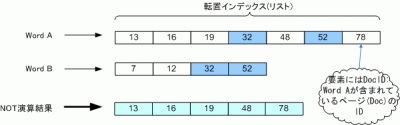
今回は集合演算のNOT演算ついて紹介します。この処理は、例として検索の際に「sky NOT rain」と指定すると、"sky"というキーワードを含むページから"rain"を含むページを除きます。

NOT演算処理の概要

NOT演算結果

上の図から、ある2つの語の転置インデックスリストをA, Bとします。ここで、リスト要素をそれぞれa, b(整数)とし演算結果を格納するリストをCとするとき、NOT演算は主に以下の処理内容を繰り返します。

  1. if a < b then 要素aをCの末尾に追加し、aにリストAの次の要素を代入
  2. if a = b then A, Bが指す次の要素をa, bに代入
  3. if a > b then bにリストBの次の要素を代入

ソースコード

今回はNOT演算処理を行う部分(メソッド)のみを示します。後で示す実行結果は、前のブログラムをベースにintersect()メソッドの挿入箇所を今回のものに置き換えたものです。

import java.util.ArrayList;
/**
* 検索エンジンのNOT演算
*/
public class BooleanRetrieval {
/**
* NOT演算処理
* @param postsSet 全ての検索語の転置インデックスリスト
* @return 演算後の転置インデックスリスト
*/
public static ArrayList<integer> subtract(ArrayList<arrayList<integer>> postsSet) {
ArrayList<integer> result; // 最終演算結果
if (postsSet == null) return null;
int len = postsSet.size();
if (len == 0) return null;
else if (len == 1) return postsSet.get(0);
result = postsSet.get(0);
for (int i = 1; i < len; i++) {
result = subtract(result, postsSet.get(i));
}
return result;
}
public static ArrayList<integer> subtract(ArrayList<integer> p1, ArrayList<integer> p2) {
ArrayList<integer> answer = new ArrayList<integer>(); // 2語の演算結果
int len1 = p1.size();
int len2 = p2.size();
int i=0, j=0;
while (i<len1 && j<len2) {
int diff = p1.get(i) - p2.get(j);
if (diff == 0) {
i++; j++;
} else if (diff < 0) {
answer.add(p1.get(i));
i++;
} else {
j++;
}
}
while (i<len1) { answer.add(p1.get(i++)); }
while (j<len2) { answer.add(p2.get(j++)); }
return answer;
}
}
単語 freq, docID
15 : 1, [2]
5 : 1, [2]
After : 1, [1]
As : 1, [1]
I : 3, [0, 1, 2]
<中略>
that : 1, [2]
the : 3, [0, 1, 2]
think : 3, [0, 1, 2]
this : 1, [2]
time : 2, [0, 2]
to : 2, [0, 1]
touch : 1, [1]
tremendously : 1, [1]
uncertainty : 1, [1]
use : 1, [2]
vigorous : 1, [1]
wanna : 1, [1]
well : 1, [1]
what : 1, [0]
when : 1, [1]
where : 1, [0]
why : 1, [1]
with : 1, [1]
検索語: the think
結果 :文書中に存在しません。
検索語: the use
結果 :文書ID [0, 1]に存在します。
検索語: the to
結果 :文書ID [2]に存在します。
検索語: quit

おー、けっこうたのしくなってきましたねー。

Python: 辞書の全てのキーと値をたどる - items(), keys(), values()メソッド

· 約2分
Yu Sasaki
Enterprise Security Manager / Advisor

ソースコード

#!/usr/bin/python
# coding: UTF-8
# 辞書の全てのキーと値をたどる | items(), keys(), values()メソッドの使い方
# 辞書の初期化
profile = { 'Hana':19, 'Toru':26, 'Katori':15, 'Sato':45}
print profile, '\n' # 出力して確認
# 辞書のitems()メソッドで全てのキー(key), 値(value)をたどる
for k, v in profile.items(): # for/if文では文末のコロン「:」を忘れないように
print k, v
# items()メソッドの戻り値
print 'items():', profile.items(), '\n' # keyとvalueのタプルのリストを返している
# 辞書のkeys()メソッドで全てのキーをたどる
for k in profile.keys():
print 'key:', k
# keys()メソッドの戻り値
print 'keys():', profile.keys(), '\n' # keyリストを返している
# 辞書のvalues()メソッドで全ての値をたどる
for v in profile.values():
print 'value:', v
# values()メソッドの戻り値
print 'values():', profile.values(), '\n' # valueのリストを返している

実行結果

{'Toru': 26, 'Hana': 19, 'Katori': 15, 'Sato': 45}
Toru 26
Hana 19
Katori 15
Sato 45
items(): [('Toru', 26), ('Hana', 19), ('Katori', 15), ('Sato', 45)]
key: Toru
key: Hana
key: Katori
key: Sato
keys(): ['Toru', 'Hana', 'Katori', 'Sato']
value: 26
value: 19
value: 15
value: 45
values(): [26, 19, 15, 45]

リファレンス

チュートリアル

Python: 辞書の初期化・出力・代入

· 約3分
Yu Sasaki
Enterprise Security Manager / Advisor

ソースコード

#!/usr/bin/python
# coding: UTF-8
# 辞書とは: リストに似たデータ型で、要素(値)を指定するのに数値以外のデータ型(key)を使用することが出来る。
# key(キー)とそれに対応するvalue(値)のペアが「辞書の一要素」となる。ハッシュみたい
# 辞書の初期化
dic1 = { 1:'robot', 'two':'AI' , 3:['Maya', 'Shade']}
dic2 = { (1, 3):'tuple' }
dicE = {} # 空の状態で初期化
# ↑書式 {key1:VALUE, key2:VALUE, ...} keyの重複はNG, valueはOK
# keyとvalueはコロン「:」で繋ぐ
# 辞書中のkeyの型は混在してもOK
# keyになれる型はimmutableな整数、文字列、タプルなど
# valueの型は何でもOK
print type(dic1) # データ型は?
print dic1 # 要素の順序が代入通りに出力されるとは限らない(決まっていない)
print type(dic2)
print dic2
print type(dicE)
print dicE
print
# もちろん、辞書の中のvalueに辞書が入っていてもOK
dic3 = { 'taro':{'age':15, 'hight':171}, 'jun':{'age':19, 'hight':178} }
print dic3
print
# 値(value)の出力
print dic1[3] # keyを[大括弧]で指定(×波括弧)
print dic3['jun']
print
# 辞書全体を出力
for k, v in dic1.items(): # for/if文では文末のコロン「:」を忘れないように
print k, v
print
# 辞書にキーと値の代入
dic4 = {}
dic4[1] = 'Python'
dic4['well'] = 'Java'
dic4['hate'] = ['remissness', 4, 9, 13]
print dic4
print 'It is %s to make full use of %s.' % ('good', dic4['well'])
print
# 値の上書き
dic4['well'] = 'Python' # 指定したキーに既に値が存在してる場合、その値を上書きする
print 'It is %s to make full use of %s.' % ('good', dic4['well'])

実行結果

<type 'dict'>
{1: 'robot', 3: ['Maya', 'Shade'], 'two': 'AI'}
<type 'dict'>
{(1, 3): 'tuple'}
<type 'dict'>
{}
{'jun': {'age': 19, 'hight': 178}, 'taro': {'age': 15, 'hight': 171}}
['Maya', 'Shade']
{'age': 19, 'hight': 178}
1 robot
3 ['Maya', 'Shade']
two AI
{1: 'Python', 'well': 'Java', 'hate': ['remissness', 4, 9, 13]}
It is good to make full use of Java.
It is good to make full use of Python.

リファレンス

チュートリアル

Python: リストの抽出・連結・要素の追加

· 約3分
Yu Sasaki
Enterprise Security Manager / Advisor

ソースコード

#!/usr/bin/python
# coding: UTF-8
# リストの初期化
num1 = [1, 4, 7, 12, 23, 41, 88, 96]
num2 = [100, 130, 255, 1000]
str1 = ['Jon', 'Mery', 'Sun', 'Ren']
str2 = ['hi', 'hello', 'hey', 'bye', 'ya']
# リストの要素を出力
print num1[3]
print num2[-2]
print
# リストの範囲を指定して抽出(シーケンス型に備わっている操作)
extr_n1 = num1[:-3] # 先頭から最末尾の3つ手前の要素までのリストを抽出
print extr_n1
extr_n2 = num1[2:] # 添え字の2から末尾までの要素のリストを抽出
print extr_n2
extr_s1 = str2[1:-2] # 添え字の1から末尾の2つ手前の要素までのリストを抽出
print extr_s1
extr_n3 = num1[1:6:2] # 1から5まで2つとびのリストを抽出
print extr_n3
extr_n4 = num1[1:6]
print extr_n4
print
# リストの連結
cmbn = num1 + num2 # 2項演算子'+'で連結
print cmbn
cmbs = str1 + str2
print cmbs
cmbhy = num1 + str1 # 中の要素が異なっていてもOK
print cmbhy
print
# リストの連結(データ型を文字列に変更)(文字列のメソッド)
print cmbs
ch = ','
cmb1 = ch.join(cmbs) # joinの引数にはstring要素のリストを。cmbnだとエラー
print type(cmb1)
print cmb1
print
# リストに要素の追加(注:データそのものを書き換える)
num3 = [1100, 1130, 1255, 1300]
print num3
num3.append(3)
print num3
str3 = ['hi', 'hello', 'hey', 'bye', 'ya']
print str3
str3.append('Yap')
print str3
print

実行結果

12
255
[1, 4, 7, 12, 23]
[7, 12, 23, 41, 88, 96]
['hello', 'hey']
[4, 12, 41]
[4, 7, 12, 23, 41]
[1, 4, 7, 12, 23, 41, 88, 96, 100, 130, 255, 1000]
['Jon', 'Mery', 'Sun', 'Ren', 'hi', 'hello', 'hey', 'bye', 'ya']
[1, 4, 7, 12, 23, 41, 88, 96, 'Jon', 'Mery', 'Sun', 'Ren']
['Jon', 'Mery', 'Sun', 'Ren', 'hi', 'hello', 'hey', 'bye', 'ya']
<type 'str'>
Jon,Mery,Sun,Ren,hi,hello,hey,bye,ya
[1100, 1130, 1255, 1300]
[1100, 1130, 1255, 1300, 3]
['hi', 'hello', 'hey', 'bye', 'ya']
['hi', 'hello', 'hey', 'bye', 'ya', 'Yap']

リファレンス

チュートリアル