メインコンテンツまでスキップ

ArrayListのコンストラクタに初期容量を指定することで要素の追加処理を高速化

· 約3分
Yu Sasaki
Enterprise Security Manager / Advisor

javaのArrayListのコンストラクタにはオーバーロードで幾つかの種類がありますが、その一つに以下のようなものがあります。

ArrayList(int initialCapacity) 指定された初期サイズで空のリストを作成します。 Java 2 Platform SE 1.3: クラス ArrayList

ArrayListは動的に容量を確保しますが、そのメモリ割り当て処理はCPUにそれなりの負荷を与えます。そこで、予め格納する容量が分かっていればコンストラクタの引数で初期容量を指定することで、その負荷の掛かる処理を事前に省くことが出来、その結果、処理時間の短縮につながります。

ちなみに、このint initialCapacityの容量の単位はコレクションの要素数です(2008/3/7修正)。

以下に初期容量を指定したときとしないときのでの処理時間を計るJavaのソースコードを示します。

import java.io.*; // for BufferedReader
import java.util.*; // for ArrayList
public class DumpFile {
/**
* @param args : 入力ファイル名
*/
public static void main(String[] args) {
String line;
ArrayList filelist = new ArrayList();
ArrayList mlist = new ArrayList(4000000); // 計測用リスト:4898304バイトのファイル
if (args.length < 1) { // コマンドライン引数の数
System.out.println("How to use: java DumpFile [filename]");
System.exit(1);
}
try {
BufferedReader br = new BufferedReader(new FileReader(args[0]));
while ((line = br.readLine()) != null) {
filelist.add(line); // 入力ファイルは一行=一要素として格納
//System.out.println(line);
}
br.close();
}
catch (Exception e) {
System.err.println(e.toString());
}
int n = filelist.size();
long start = System.currentTimeMillis(); // 処理時間の計測開始
for (int i = 0; i < n; i++) {
//System.out.println(list.get(i));
mlist.add(filelist.get(i));
}
long end = System.currentTimeMillis();
System.out.println("実行時間:" + (end - start) + "ms");
/*for (int i = 0; i < n; i++) {
System.out.println(mlist.get(i));
}*/
}
}

入力ファイルは日本語単語405,000語で4898304Byteです。

…< 中略>…
楽観
楽観さ
楽観し
楽観した
楽観したら
楽観したり
楽観したろう
楽観しちゃ
…< 中略>…

結果は、

mlistに対して初期容量を指定しない場合:17ms mlistに対して初期容量を指定した 場合:8ms

となり、今回の場合は処理時間を1/2に短縮できていることが分かりました。 ちなみに、ArrayListのメモリ動的割り当て容量は、現在の容量の1.5倍のようです。

int newCapacity = (oldCapacity * 3)/2 + 1; ArrayList#ensureCapacityメソッド内の一文 - ArrayList.java 1.56 06/04/21

参考にしたサイト

  • Java 入門 | ArrayList クラス

追記(2008/3/7):

1.コンストラクタでインスタンス容量を指定するものとして、StringBufferクラスがあります。これも、

StringBuffer sb = new StringBuffer(40000); // 40KByteを確保

のように指定します。

これによって、append()やinsert()によって予め割り当てられたバッファを越す際に呼び出されるメモリ動的割り当て処理を軽減することが出来ます。

2.ArrayListのコンストラクタに引数を指定しない場合は10個の要素を持った配列が作られます。

/** * Constructs an empty list with an initial capacity of ten. */ public ArrayList() { this(10); } ArrayList.java 1.56 06/04/21

JavaとRubyで文字列の終端の扱いの違い

· 約2分
Yu Sasaki
Enterprise Security Manager / Advisor

RubyのコードをJavaに書き直す際に注意する相違点が幾つかあったので、そのうちの一つを挙げてみます。特に文字列関係は色々やりにくいです。

a = "4321"
p a[4] #=> nil

Rubyでは文字を[]で指すとき終端文字の次の添え字を指すとnilを返します。これをCで言う文字列の終端文字'\0'のように考え、if文などの判定に用いることが出来ます。

対して、Javaで同じような書式で書こうものなら、

public class Test {
public static void main(String[] args) {
String str = "abcdef";
char[] arr = str.toCharArray(); // String型をchar型の配列に変換
System.out.println(arr);
System.out.println(str.length()+ " == " + arr.length);
try {
System.out.println(arr[6]);
} catch (java.lang.ArrayIndexOutOfBoundsException e) {
System.out.println("キャッチ:" + e);
- }
try {
System.out.println(str.charAt(6));
} catch (java.lang.StringIndexOutOfBoundsException e) {
System.out.println("キャッチ:" + e);
}
// 最後の文字を知るためには
System.out.println(str.charAt(str.length() - 1));
}
}

のように例外でキャッチしなければなりません。

実行結果

6 == 6
abcdef
キャッチ:java.lang.ArrayIndexOutOfBoundsException: 6
キャッチ:java.lang.StringIndexOutOfBoundsException: String index out of range: 6
f

まぁ、str.length()を用いて文字列長でcharAtで指す文字が文字列の末尾かどうかを判定することで制御すればよいまでの話かもしれません。

今回はとあるアルゴリズムを移植上、気づきが色々あったのでこうした機会に言語仕様に対する理解を深めていきたいです。

AS3はじめました

· 約1分
Yu Sasaki
Enterprise Security Manager / Advisor

以前、3D-MindMapみたいなソフトを作ろうと思ってJava3Dをかじったのですが、現在はAPIが標準ライブラリに含まれていないので、制作物の配布がやりずらそうだなぁと、それじゃDirectXかOpneGLあたりでゴリゴリ書こうかなと当初は思っていました。

しかし、AS3になって実行速度がある程度改善されたのと、文法がすっきり(Javaに似てる)しているのでとっつき易そうだなと思い、AS3を始めました。それに、ブラウザというある種の共通の環境で動作すのが良いかと考えました。

さて手始めに早速一つ、マウスでドラックしている間、線を描くFlashです。

C#でキッチンタイマーを作ろう

· 約5分
Yu Sasaki
Enterprise Security Manager / Advisor

別名、カウントダウンタイマー。今回学んだことは、以下の二点。

  • X秒からh:m:s形式での表示。
  • タイマースレッドの利用。

タイマーイベント毎に重い処理を行うと表示時間と実時間のずれが大きくなるので注意。その場合はイベント発生間隔を長めに取る。

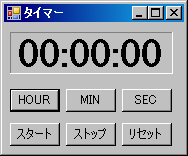
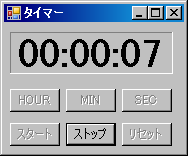
プログラムの実行結果

起動時

C#カウントダウンタイマー1

実行時

C#カウントダウンタイマー2

尚、ボタンをロック(非活性)するにはボタンインスタンスのEnabledプロパティにfalseを代入する(ロック解除はture)。

例(butstartはボタンクラスのインスタンス変数):

butstart.Enabled = false; // スタートボタンをロック(スタートが押されたら場合)

ソースコード

FormTimer.cs

using System;
using System.Collections.Generic;
using System.ComponentModel;
using System.Data;
using System.Drawing;
using System.Text;
using System.Windows.Forms;
/**
* キッチンタイマー
* Web page: https://yukun.info/
* license GPLv2
*/
namespace Sample
{
public partial class FormTimer : Form
{
public FormTimer()
{
InitializeComponent();
// マウスポインタの場所に表示
this.DesktopLocation = new Point(System.Windows.Forms.Cursor.Position.X,
System.Windows.Forms.Cursor.Position.Y);
}
int sec = 0; // 計測時間
private void viewtime()
{
stLabel1.Text = "" + sec / 36000 % 10 + sec / 3600 % 10 +
":" + sec / 600 % 6 + sec / 60 % 10 +
":" + sec / 10 % 6 + sec % 10;
}
private void timer1_Tick(object sender, EventArgs e)
{
sec--;
if (0 == sec)
{
sttimer.Enabled = false;
System.Media.SystemSounds.Beep.Play();
this.Activate();
}
viewtime();
}
private void butsec_Click(object sender, EventArgs e)
{
sec += 10;
viewtime();
}
private void butmin_Click(object sender, EventArgs e)
{
sec += 60;
viewtime();
}
private void buthour_Click(object sender, EventArgs e)
{
sec += 3600;
if (sec >= 360000) sec = 0;
viewtime();
}
private void butstart_Click(object sender, EventArgs e)
{
if (0 == sec) return;
sttimer.Enabled = true;
this.butstop.Enabled = true;
this.butstart.Enabled = false;
this.buthour.Enabled = false;
this.butmin.Enabled = false;
this.butsec.Enabled = false;
this.butreset.Enabled = false;
}
private void butstop_Click(object sender, EventArgs e)
{
sttimer.Enabled = false;
this.butstop.Enabled = false;
this.butstart.Enabled = true;
this.buthour.Enabled = true;
this.butmin.Enabled = true;
this.butsec.Enabled = true;
this.butreset.Enabled = true;
}
private void butreset_Click(object sender, EventArgs e)
{
stLabel1.Text = "00:00:00";
sec = 0;
}
private void 常に手前に表示ToolStripMenuItem_Click(object sender, EventArgs e)
{
//クリックするごとにこのフォームを常に手前または解除します。
this.TopMost = !this.TopMost;
}
}
}

FormTimer.Designer.cs

namespace Sample
{
partial class FormTimer
{
/// <summary>
/// 必要なデザイナ変数です。
/// </summary>
private System.ComponentModel.IContainer components = null;
/// <summary>
/// 使用中のリソースをすべてクリーンアップします。
/// </summary>
/// <param name="disposing">マネージ リソースが破棄される場合 true、破棄されない場合は false です。</param>
protected override void Dispose(bool disposing)
{
if (disposing && (components != null))
{
components.Dispose();
}
base.Dispose(disposing);
}
#region Windows フォーム デザイナで生成されたコード
/// <summary>
/// デザイナ サポートに必要なメソッドです。このメソッドの内容を
/// コード エディタで変更しないでください。
/// </summary>
private void InitializeComponent()
{
this.components = new System.ComponentModel.Container();
this.sttimer = new System.Windows.Forms.Timer(this.components);
this.buthour = new System.Windows.Forms.Button();
this.butmin = new System.Windows.Forms.Button();
this.butsec = new System.Windows.Forms.Button();
this.butstart = new System.Windows.Forms.Button();
this.stLabel1 = new System.Windows.Forms.Label();
this.butstop = new System.Windows.Forms.Button();
this.butreset = new System.Windows.Forms.Button();
this.contextMenuStrip1 = new System.Windows.Forms.ContextMenuStrip(this.components);
this.常に手前に表示ToolStripMenuItem = new System.Windows.Forms.ToolStripMenuItem();
this.contextMenuStrip1.SuspendLayout();
this.SuspendLayout();
//
// sttimer
//
this.sttimer.Interval = 1000;
this.sttimer.Tick += new System.EventHandler(this.timer1_Tick);
//
// buthour
//
this.buthour.Location = new System.Drawing.Point(6, 66);
this.buthour.Name = "buthour";
this.buthour.Size = new System.Drawing.Size(50, 23);
this.buthour.TabIndex = 0;
this.buthour.Text = "HOUR";
this.buthour.UseVisualStyleBackColor = true;
this.buthour.Click += new System.EventHandler(this.buthour_Click);
//
// butmin
//
this.butmin.Location = new System.Drawing.Point(62, 66);
this.butmin.Name = "butmin";
this.butmin.Size = new System.Drawing.Size(50, 23);
this.butmin.TabIndex = 1;
this.butmin.Text = "MIN";
this.butmin.UseVisualStyleBackColor = true;
this.butmin.Click += new System.EventHandler(this.butmin_Click);
//
// butsec
//
this.butsec.Location = new System.Drawing.Point(118, 66);
this.butsec.Name = "butsec";
this.butsec.Size = new System.Drawing.Size(50, 23);
this.butsec.TabIndex = 2;
this.butsec.Text = "SEC";
this.butsec.UseVisualStyleBackColor = true;
this.butsec.Click += new System.EventHandler(this.butsec_Click);
//
// butstart
//
this.butstart.Location = new System.Drawing.Point(6, 100);
this.butstart.Name = "butstart";
this.butstart.Size = new System.Drawing.Size(50, 23);
this.butstart.TabIndex = 3;
this.butstart.Text = "スタート";
this.butstart.UseVisualStyleBackColor = true;
this.butstart.Click += new System.EventHandler(this.butstart_Click);
//
// stLabel1
//
this.stLabel1.AutoSize = true;
this.stLabel1.BackColor = System.Drawing.SystemColors.Control;
this.stLabel1.BorderStyle = System.Windows.Forms.BorderStyle.Fixed3D;
this.stLabel1.Font = new System.Drawing.Font("Times New Roman", 30F, System.Drawing.FontStyle.Bold, System.Drawing.GraphicsUnit.Point, ((byte)(128)));
this.stLabel1.Location = new System.Drawing.Point(6, 9);
this.stLabel1.Name = "stLabel1";
this.stLabel1.Size = new System.Drawing.Size(163, 42);
this.stLabel1.TabIndex = 4;
this.stLabel1.Text = "00:00:00";
//
// butstop
//
this.butstop.Location = new System.Drawing.Point(62, 100);
this.butstop.Name = "butstop";
this.butstop.Size = new System.Drawing.Size(50, 23);
this.butstop.TabIndex = 5;
this.butstop.Text = "ストップ";
this.butstop.UseVisualStyleBackColor = true;
this.butstop.Click += new System.EventHandler(this.butstop_Click);
//
// butreset
//
this.butreset.Location = new System.Drawing.Point(118, 100);
this.butreset.Name = "butreset";
this.butreset.Size = new System.Drawing.Size(50, 23);
this.butreset.TabIndex = 6;
this.butreset.Text = "リセット";
this.butreset.UseVisualStyleBackColor = true;
this.butreset.Click += new System.EventHandler(this.butreset_Click);
//
// contextMenuStrip1
//
this.contextMenuStrip1.Items.AddRange(new System.Windows.Forms.ToolStripItem[] {
this.常に手前に表示ToolStripMenuItem});
this.contextMenuStrip1.Name = "contextMenuStrip1";
this.contextMenuStrip1.Size = new System.Drawing.Size(171, 26);
//
// 常に手前に表示ToolStripMenuItem
//
this.常に手前に表示ToolStripMenuItem.CheckOnClick = true;
this.常に手前に表示ToolStripMenuItem.Name = "常に手前に表示ToolStripMenuItem";
this.常に手前に表示ToolStripMenuItem.Size = new System.Drawing.Size(170, 22);
this.常に手前に表示ToolStripMenuItem.Text = "常に Top に表示する";
this.常に手前に表示ToolStripMenuItem.Click += new System.EventHandler(this.常に手前に表示ToolStripMenuItem_Click);
//
// FormTimer
//
this.AutoScaleDimensions = new System.Drawing.SizeF(6F, 12F);
this.AutoScaleMode = System.Windows.Forms.AutoScaleMode.Font;
this.ClientSize = new System.Drawing.Size(180, 129);
this.ContextMenuStrip = this.contextMenuStrip1;
this.Controls.Add(this.butreset);
this.Controls.Add(this.butstop);
this.Controls.Add(this.stLabel1);
this.Controls.Add(this.butstart);
this.Controls.Add(this.butsec);
this.Controls.Add(this.butmin);
this.Controls.Add(this.buthour);
this.Name = "FormTimer";
this.StartPosition = System.Windows.Forms.FormStartPosition.Manual;
this.Text = "タイマー";
this.contextMenuStrip1.ResumeLayout(false);
this.ResumeLayout(false);
this.PerformLayout();
}
#endregion
private System.Windows.Forms.Button buthour;
private System.Windows.Forms.Button butmin;
private System.Windows.Forms.Button butsec;
private System.Windows.Forms.Button butstart;
private System.Windows.Forms.Label stLabel1;
private System.Windows.Forms.Button butstop;
private System.Windows.Forms.Button butreset;
private System.Windows.Forms.Timer sttimer;
private System.Windows.Forms.ContextMenuStrip contextMenuStrip1;
private System.Windows.Forms.ToolStripMenuItem 常に手前に表示ToolStripMenuItem;
}
}

3種類の括弧の対応をチェックするC言語プログラム

· 約4分
Yu Sasaki
Enterprise Security Manager / Advisor

先日勉強会でこの辺のテーマを取り上げたので、字句解析や構文解析(の一部)とスタックの復習も兼ねて作成(required for 1h+)。

実装のポイント

  • 閉じ括弧の有無の判定は、ファイルの終端が読み終わった後。
  • 開き括弧の判定は、閉じ括弧を読み込んだ際に行い、スタックの最上位に対応する開き括弧があるか否かで。
  • 入れ子の(または再帰的な)構造で、どの深さにスレッドがいるか調べるにはスタックを用いる。

Webページから指定したタグの要素を抜き出すRuby関数

· 約2分
Yu Sasaki
Enterprise Security Manager / Advisor

単一のWebページから抜き出した複数の要素を配列に格納して返します。 以下の例はaタグの要素(エレメント)を抽出した場合です。

Rubyコード

require 'net/http'
require 'kconv'
def parse_array(string, beg_tag, close_tag)
array = Array.new
string.scan(/#{beg_tag}(.*?)#{close_tag}/sm) { |matched|
#puts matched
array = array | matched
}
return array
end
Net::HTTP.version_1_2
Net::HTTP.start('b.hatena.ne.jp', 80) {|http|
response = http.get('/hotentry/')
str = Kconv.tosjis(response.body)
a_tag_array = parse_array(str, "" )
puts a_tag_array
}

学んだこと

  • Net::HTTP.startメソッドをブロックを用いて呼び出すことによって、ブロックの間だけセッションを開いて接続し、ブロック終了とともに自動的にセッションを閉じる。Rubyに慣れてもJavaやCでの手続きを意識しておくこと。
  • 配列の結合には和集合(演算子は「|」)を用いた。この場合、重複する要素は1つとして数えられる。別々に数えたい場合は「+」演算子を用いる。
  • String#scanメソッドはブロックで用いるとブロック変数にマッチした部分を格納する。その際、正規表現の中で「()」が用いられると、()内の部分を配列にして返す。今回は別に配列にする必要はなかったかも。

参考サイト

Web サーバからドキュメントを得る - Rubyist Magazine - 標準添付ライブラリ紹介 【第 7 回】 net/http

タグの中の要素を抜き出すRuby関数

· 約1分
Yu Sasaki
Enterprise Security Manager / Advisor

ライブラリを使えば簡単ですが、正規表現の学習の為に。

ソースコード

def return_between(unporsed, start, termi)
unporsed =~ /#{start}(.*?)#{termi}/
return $1
end
str = "<title>Trump Code</title>"
start = "<title>"
termi = "</title>"
puts return_between(str, start, termi)
#=> Trump Code

ここで学んだことは、正規表現の規則中に変数を用いる際は#{var_str}と表記すること。

POSTメソッドを用いてExcite翻訳を行うRubyコード

· 約1分
Yu Sasaki
Enterprise Security Manager / Advisor

しかし、未完です。

Webの巡回などにはWWW::Mechanizeという便利なライブラリがありますが、あえてnet/httpのPOSTメソッドを使う理由は、単にPOSTそのものと正規表現の学習をするためです。

今回は正規表現で試行錯誤。

Rubyソースコード

#!/usr/bin/ruby
require 'net/http'
require 'kconv'
before = "hello"
http = Net::HTTP.new('www.excite.co.jp')
response = http.post('/world/english', "before=#{before}&wb_lp=ENJA")
result = Kconv.tosjis(response.body)
result =~ /"after"[^>]*>(.*)/ism
puts $1

実行結果

こんにちは
<中略>

ここで、正規表現

/"after"[^>]*>(.*)/ism

の部分を

/"after"[^>]*>(.*)< \/textarea>/ism

に変更するとマッチしなくなってしまいました。
オプション指定のmで複数行にマッチするはずなんですが・・・うーん、何を見落としているのだろう。

Rubyで引数の設定値によって4パターンの部分文字列を取得するラッパー関数

· 約2分
Yu Sasaki
Enterprise Security Manager / Advisor

引数に設定値を与え、それによって挙動を変えることで、似た機能をまとめてみます。

追記(2008.2.8):正規表現のマッチを保持する変数があったことを失念していました。「$`」マッチした部分より前の文字列、「$&」マッチした文字列、「$'」マッチした部分より後ろの文字列を使えばより簡潔に書けると思いました。

ソースコード

EXCL = true
INCL = false
BEFORE = true
AFTER = false
#
# string 分割する文字列
# delineator 分割する場所
# desired BEFORE: delineator 文字列より前の文字列
# AFTER: delineator 文字列より後の文字列
# type INCL: 分割文字列に delineator を加える
# EXCL: 分割文字列に delineator を加えない
def split_str(string, delineator, desired, type)
low_str = string.downcase # 小文字に揃える(変換)
marker = delineator.downcase
return if (low_str.index(marker) == nil) # delineator に一致しない
if (desired == BEFORE)
if (type == EXCL)
split_pos = low_str.index(marker)
else
split_pos = low_str.index(marker) + marker.length
end
parsed_str = low_str[0, split_pos]
else
if (type == EXCL)
split_pos = low_str.index(marker)+marker.length
else
split_pos = low_str.index(marker)
end
parsed_str = low_str[split_pos, string.length]
end
return parsed_str
end
string = "I'm designing a Web crawler and a Search engine."
p split_str(string, "crawler", BEFORE, INCL);
p split_str(string, "crawler", BEFORE, EXCL);
p split_str(string, "crawler", AFTER, INCL);
p split_str(string, "crawler", AFTER, EXCL);
p split_str(string, "crauler", AFTER, EXCL);

実行結果

"i'm designing a web crawler"
"i'm designing a web "
"crawler and a search engine."
" and a search engine."
nil

単に部分文字列を取得するには

str = "A Web crawler"
p str[6, str.size] #=> "crawler"

10進数を2進数に変換表示するC言語プログラム

· 約2分
Yu Sasaki
Enterprise Security Manager / Advisor

ソースコード

// filename: dtob.c
// convert decimal to binary
#include <stdio.h>
const int BitSize = sizeof(int) * 8; // 整数型のビットサイズを算出
void dtob(int x) {
int bit = 1, i;
char c[BitSize];
for (i = 0; i < BitSize; i++) {
if (x & bit)
c[i] = '1';
else
c[i] = '0';
bit <<= 1;
}
// 計算結果の表示
printf("2進数: ");
for ( i = BitSize - 1; i >= 0; i-- ) {
putchar(c[i]);
}
printf("\n");
}
int main()
{
int x = 0;
do {
printf("10進数を2進数に変換します(0で終了)\n");
printf("xの値: ");
scanf("%d", &x);
dtob(x);
} while (x != 0);
return 0;
}

実行結果

$ gcc dtob.c
$ ./a.out
10進数を2進数に変換します(0で終了)
xの値: 5
2進数: 00000000000000000000000000000101
10進数を2進数に変換します(0で終了)
xの値: 8
2進数: 00000000000000000000000000001000
10進数を2進数に変換します(0で終了)
xの値: 100
2進数: 00000000000000000000000001100100
10進数を2進数に変換します(0で終了)
xの値: 256
2進数: 00000000000000000000000100000000
10進数を2進数に変換します(0で終了)
xの値: 1984949894
2進数: 01110110010011111110111010000110
10進数を2進数に変換します(0で終了)
xの値: 0
2進数: 00000000000000000000000000000000
$

ビットが0か1の判断するループ順序を逆にして、配列末尾に'\0'を代入すれば、計算結果の表示は配列の文字列表示ですみます。そうすると「計算結果の表示」の際にforループを使う必要はないなぁ、と書き終わった今思いました(ぇー)。

作成の経緯

以前、拡張ハッシュ法の削除関数を実装している際に、キーをバケットに振り分ける際のアドレス算出の処理部分にデバッグプリントが欲しくて作ったものです。