メインコンテンツまでスキップ

「Number」タグの記事が7件件あります

全てのタグを見る

Android: 10進数→2進数変換アプリ

· 約3分

Yu Sasaki
Enterprise Security Manager / Advisor

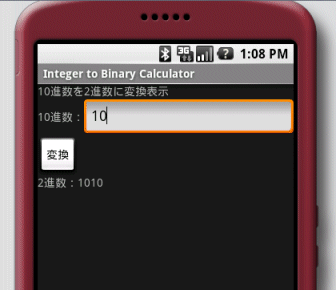
試しに下図のような簡素な10進2進変換アプリを作ってみました。 以下は書いてみたコード。

ソースコード

res/values/strings.xml

<?xml version="1.0" encoding="utf-8"?>
<resources>
<string name="app_name">Integer to Binary Calculator</string>
<string name="label_description">10進数を2進数に変換表示</string>
<string name="label_integer">10進数:</string>
<string name="label_binary">2進数:</string>
<string name="button_convert">変換</string>
</resources>

res/layout/main.xml

<?xml version="1.0" encoding="utf-8"?>
<linearLayout xmlns:android="http://schemas.android.com/apk/res/android"
android:orientation="vertical"
android:layout_width="fill_parent"
android:layout_height="fill_parent"
>
<textView
android:layout_width="fill_parent"
android:layout_height="wrap_content"
android:text="@string/label_description"
/>
<linearLayout
android:orientation="horizontal"
android:layout_width="fill_parent"
android:layout_height="wrap_content"
>
<textView
android:layout_width="wrap_content"
android:layout_height="wrap_content"
android:text="@string/label_integer"
/>
<editText android:id="@+id/text_integer"
android:layout_width="fill_parent"
android:layout_height="wrap_content"
android:numeric="integer"
android:maxLength="9"
android:text=""
/>
</linearLayout>
<button android:id="@+id/button_convert"
android:layout_width="wrap_content"
android:layout_height="wrap_content"
android:text="@string/button_convert"
/>
<textView android:id="@+id/label_result"
android:layout_width="fill_parent"
android:layout_height="wrap_content"
android:text=""
/>
</linearLayout>

ITBCalculatorActivity.java

package info.yukun.android.itbcalc;
import android.app.Activity;
import android.os.Bundle;
import android.view.View;
import android.widget.Button;
import android.widget.EditText;
import android.widget.TextView;
public class ITBCalculatorActivity extends Activity {
/** Called when the activity is first created. */
@Override
public void onCreate(Bundle savedInstanceState) { // アクティビティが生成される際に必ず呼び出される
super.onCreate(savedInstanceState);
setContentView(R.layout.main); // UIのレイアウトを設定
// 指定したリソース(R.java)インデックスからビュー(res/layout/main.xml)内のidのコンポーネント(ここではButton)インスタンスを取得
Button button = (Button) findViewById(R.id.button_convert);
button.setOnClickListener(convertToBinary); // ボタンが押された際のイベントを登録
}
// 登録するイベントリスナーはView.OnClickListenerを実装
private View.OnClickListener convertToBinary = new View.OnClickListener() {
public void onClick(View view) { // ボタンが押されたときに呼び出されるメソッド
EditText textInteger = (EditText) findViewById(R.id.text_integer); // 入力値が入っているコンポーネントを取得
String input = textInteger.getText().toString();
if (input.equals("")) return;
int intValue = Integer.parseInt(input);
String binValue = Integer.toBinaryString(intValue); // 10進数整数を2進数文字列に変換
TextView labelResult = (TextView) findViewById(R.id.label_result); // 結果を表示するTextViewを取得
labelResult.setText("2進数:" + binValue);
}
};
}

Androidアプリを書いてみて

EditText android:id="@+id/text_integer"の属性android:maxLengthを"9"としたのは、変換メソッドInteger.toBinaryString(int value)の引数が32bit整数の為です。本当は属性値を10としてonClickメソッド内で32bitの範囲内(-2 147 483 647 ~ 2 147 483 647 = (2^31) - 1)か否かを判定したほうが良いと思うのですが、今回は端折りました。 ビジュアルエディタやXMLでUIのレイアウトを作っていくというのはFlexのmxmlに似てて取っ掛かり易い感じです。

Python: 10進数整数を2進数文字列に変換する関数

· 約2分
Yu Sasaki
Enterprise Security Manager / Advisor

2進数文字列を10進数整数に変換する関数int()はありますが、

>>> int('1011', 2)
11

その逆の、10進数整数を2進数文字列に変換する関数が(Python2.5では)見当たらなかったので、書いてみました。

ソースコード

#!/usr/bin/python
# coding: UTF-8
import math, string
# 10進数整数を2進数文字列に変換する関数
# decimal : 10進数整数
# press : 上位桁の0を切り詰めるフラグ
def toBinary(decimal, press=True):
if decimal == 0: return '0'
bin_str = ""
i = 31
while i >= 0:
bi = int((decimal & int(math.pow(2, i))) >> i)
bin_str += str(bi)
i -= 1
if press:
try:
bin_str = bin_str[bin_str.index('1'):]
except ValueError:
print 'error'
bin_str = '0'
return bin_str
bin_arr = [toBinary(i) for i in range(21)]
print '10進数t2進数'
for i in range(len(bin_arr)):
print '%2dt%5s' % (i, bin_arr[i])

Pythonでは明示的に型変換する必要がありますので、所々int()、str()を用いて型直ししています。

実行結果

10進数 2進数
0 0
1 1
2 10
3 11
4 100
5 101
6 110
7 111
8 1000
9 1001
10 1010
11 1011
12 1100
13 1101
14 1110
15 1111
16 10000
17 10001
18 10010
19 10011
20 10100

追記: 32bit以上の整数を扱う場合

参考: 10進数を2進数と16進数に変換する - gan2 の Ruby 勉強日記 ↑の記事で、データサイズにかかわらず処理できるRubyプログラムがありましたので、参考させていただきました。

def toBinary2(decimal):
if decimal == 0: return '0'
bin_str = ""
while decimal > 0:
bin_str += str(decimal % 2)
decimal >>= 1
return bin_str[::-1]

実行結果は上と同じです。

リファレンス

Python: if/for文でのin演算子の各オブジェクト毎の評価

· 約3分
Yu Sasaki
Enterprise Security Manager / Advisor

if/for文中で使われるin演算子の評価はオブジェクトごとに微妙に変化します。あやふやなままにしておくのもなんですし、ここで、以下のオブジェクトに対するif/for文中の評価を実際に確認してみましょう。

  • 文字列
  • リスト
    • 数値のリスト
    • 文字列のリスト
    • 辞書のリスト
  • 辞書

if/for文 + in 文字列

#!/usr/bin/python
# coding: UTF-8
str1 = "abcdefghijklmn" # 文字列
# if 「検索する文字列」 in 「検索される文字列」:
elem = 'def'
if elem in str1:
print '文字列 "%s" に "%s" は存在する。' % (str1, elem)
print
# for 「要素(文字)」 in 「文字列」:
for ch in str1:
print ch, # str1の先頭の文字から順に繰り返す

実行結果

文字列 "abcdefghijklmn" に "def" は存在する。
a b c d e f g h i j k l m n

if/for文 + in リスト

#!/usr/bin/python
# coding: UTF-8
nums = [1, 2, 3, 4, 5] # 数値のリスト
chs = ['a', 'b', 'c', 'd'] # 文字列のリスト
dics = [{'one':1}, {'two':2}, {'three':3}, {'four':4}] # 辞書のリスト
# if 「検索する要素」 in 「検索されるリスト」:
elem = 3
if elem in nums:
print 'リスト %s に要素の %d は存在する。' % (nums, elem)
elem = 'b'
if elem in chs:
print 'リスト2 %s に要素の %s は存在する。' % (chs, elem)
elem = {'two':2}
if elem in dics:
print 'リスト3 %s に要素の %s は存在する。' % (dics, elem)
print
# for 「リストの要素」 in 「リスト」:
for e_num in nums:
print e_num,
print
for e_ch in chs:
print e_ch,
print
for e_dic in dics:
print e_dic,

実行結果

リスト [1, 2, 3, 4, 5] に要素の 3 は存在する。
リスト2 ['a', 'b', 'c', 'd'] に要素の b は存在する。
リスト3 [{'one': 1}, {'two': 2}, {'three': 3}, {'four': 4}] に要素の {'two': 2} は存在する。
1 2 3 4 5
a b c d
{'one': 1} {'two': 2} {'three': 3} {'four': 4}

if/for文 + in 辞書

#!/usr/bin/python
# coding: UTF-8
dic = {'one':1, 'two':2, 'three':3, 'four':4} # 辞書
# if 「検索するキー」 in 「検索される辞書」:
elem = 'three'
if elem in dic: # 辞書のキーの検索
print '辞書 %s に要素の「キー」 %s は存在する。' % (dics, elem)
print
# for 「辞書のキー」 in 「辞書」:
for key in dic: # for key in dic.keys(): と同じ
print key,
print
for v in dic.values(): # 値を要素として繰り返す
print v,
print
for (k, v) in dic.items(): # (キー, 値)のタプルを要素として繰り返す
print "%s:%s, " % (k, v),

実行結果

辞書 [{'one': 1}, {'two': 2}, {'three': 3}, {'four': 4}] に要素の「キー」 three は存在する。
four three two one
4 3 2 1
four:4, three:3, two:2, one:1,

チュートリアル

リファレンス

Python: モジュールにテスト関数を定義 - 重複のない乱数(整数MIN以上MAX以下)の生成

· 約2分
Yu Sasaki
Enterprise Security Manager / Advisor

ソースコード

#!/usr/bin/python
# coding: UTF-8
import random
def make_randint_list(min, max, cnt, sortflag=False, revflag=False):
"""
重複のない乱数(整数min以上max以下)を要素としたリストを返す
"""
list = []
i = 0
while cnt != i:
r = random.randint(min, max)
try:
list.index(r) # 既にリストに存在するか
except ValueError, e:
list.append(r) # 無い場合はリストに格納
i = i + 1
if (sortflag): list.sort(reverse=revflag)
return list
def _main():
"""モジュールのチェック関数"""
print 'makerand0.py [_main()]'
print make_randint_list(10, 99, 10)
print make_randint_list(10, 99, 10, True) # 昇順ソート
print make_randint_list(10, 99, 10, True, True) # 降順ソート
if __name__ == '__main__' : _main()
#

モジュール変数__name__の中には通常はモジュール名が入っています。しかし、このモジュールファイルを直接実行した場合は__name__に'__main__'という名前が入ります。その為、if __name__ == '__main__' : は真となり_main()が実行されます。

実行結果

$ python makerand0.py
makerand0.py [_main()]
[62, 18, 55, 44, 97, 67, 87, 16, 59, 43]
[11, 13, 30, 42, 46, 52, 71, 75, 81, 92]
[88, 81, 65, 60, 57, 53, 41, 34, 27, 23]

モジュールテスト用スクリプト

makerand0_test.py

#!/usr/bin/python
# coding: UTF-8
from makerand import make_randint_list
print make_randint_list(10, 99, 10)
print make_randint_list(10, 99, 10, True)
print make_randint_list(10, 99, 10, True, True)

実行結果

$ python makerand0_test.py
[52, 44, 63, 61, 50, 66, 88, 45, 99, 57]
[15, 26, 29, 53, 56, 69, 89, 91, 94, 95]
[96, 95, 93, 88, 79, 75, 64, 62, 33, 11]

リファレンス

チュートリアル

Python: 乱数の生成 - random()、randint()、uniform()、seed()メソッド

· 約2分
Yu Sasaki
Enterprise Security Manager / Advisor

ソースコード

#!/usr/bin/python
# coding: UTF-8
# 乱数の生成 | random()、randint()、uniform()、seed()メソッドの使い方
import random # モジュールのインポート
print random.random(), 'n' # 0.0 ≦ F < 1.0 の浮動小数点数をランダムに返す
# randint(x, y)メソッド: 整数x以上y以下(x ≦ N ≦ y)の乱数を返す
for i in range(10):
print random.randint(10, 20), ' ',
print 'n'
# uniform(x, y)メソッド: 実数x以上y未満(x ≦ N < y)の乱数を返す
for i in range(10):
print random.uniform(10, 20)
print
# seed()メソッド: 乱数の種の初期化
# (省略した場合はシステムの現在時刻で初期化が行われる)
random.seed(1) # 明示的に初期化
for i in range(10):
print random.randint(10, 20), ' ',
print 'n'
random.seed(1) # もう一度初期化(結果は上と同じとなる)
for i in range(10):
print random.randint(10, 20), ' ',
print 'n'

実行結果

0.610071743263
16 16 15 11 19 16 10 11 20 18
12.8745815718
10.3223430071
10.9674507421
17.5459589302
16.0796539779
15.0854025011
18.6344006559
11.049275088
16.6396732404
12.0720922586
11 19 18 12 15 14 17 18 11 10
11 19 18 12 15 14 17 18 11 10

リファレンス

10進数を2進数に変換表示するC言語プログラム

· 約2分
Yu Sasaki
Enterprise Security Manager / Advisor

ソースコード

// filename: dtob.c
// convert decimal to binary
#include <stdio.h>
const int BitSize = sizeof(int) * 8; // 整数型のビットサイズを算出
void dtob(int x) {
int bit = 1, i;
char c[BitSize];
for (i = 0; i < BitSize; i++) {
if (x & bit)
c[i] = '1';
else
c[i] = '0';
bit <<= 1;
}
// 計算結果の表示
printf("2進数: ");
for ( i = BitSize - 1; i >= 0; i-- ) {
putchar(c[i]);
}
printf("\n");
}
int main()
{
int x = 0;
do {
printf("10進数を2進数に変換します(0で終了)\n");
printf("xの値: ");
scanf("%d", &x);
dtob(x);
} while (x != 0);
return 0;
}

実行結果

$ gcc dtob.c
$ ./a.out
10進数を2進数に変換します(0で終了)
xの値: 5
2進数: 00000000000000000000000000000101
10進数を2進数に変換します(0で終了)
xの値: 8
2進数: 00000000000000000000000000001000
10進数を2進数に変換します(0で終了)
xの値: 100
2進数: 00000000000000000000000001100100
10進数を2進数に変換します(0で終了)
xの値: 256
2進数: 00000000000000000000000100000000
10進数を2進数に変換します(0で終了)
xの値: 1984949894
2進数: 01110110010011111110111010000110
10進数を2進数に変換します(0で終了)
xの値: 0
2進数: 00000000000000000000000000000000
$

ビットが0か1の判断するループ順序を逆にして、配列末尾に'\0'を代入すれば、計算結果の表示は配列の文字列表示ですみます。そうすると「計算結果の表示」の際にforループを使う必要はないなぁ、と書き終わった今思いました(ぇー)。

作成の経緯

以前、拡張ハッシュ法の削除関数を実装している際に、キーをバケットに振り分ける際のアドレス算出の処理部分にデバッグプリントが欲しくて作ったものです。

C++でMIN以上MAX未満の乱数を生成

· 約1分
Yu Sasaki
Enterprise Security Manager / Advisor

ソースコード

#include <ctime> // for time()
#include <cstdlib> // for srand(), rand()
#include <iostream>
using namespace std;
#define MIN 10
#define MAX 21
int main()
{
srand(time(NULL)); // 現在時刻を乱数の種の設定
int lucky = MIN + rand() % (MAX - MIN); // MIN以上MAX未満の乱数を生成
cout < < "生成した乱数は" << lucky << "です。n";
for (int i = 0; i< 100; i++) { // 100個生成
cout << MIN + rand() % (MAX - MIN) << " ";
}
return 0;
}